Hashes

Last week I was doing a training and we touched upon the topic of hashes and I failed to make it simple so I needed to follow up with an example.
Of course Wikipedia can be used:
https://en.wikipedia.org/wiki/Hash_function
A hash is a fixed-size “fingerprint” of some data, produced by running that data through a mathematical function called a hash function. Hashes are widely used in computer science and security to identify data, check integrity, and store secrets like passwords without keeping the original values.
So a practical example is for downloads for example. I am using Jellyfin for example, an opensource media platform, https://jellyfin.org/ which offers downloads and on the download page you find this:
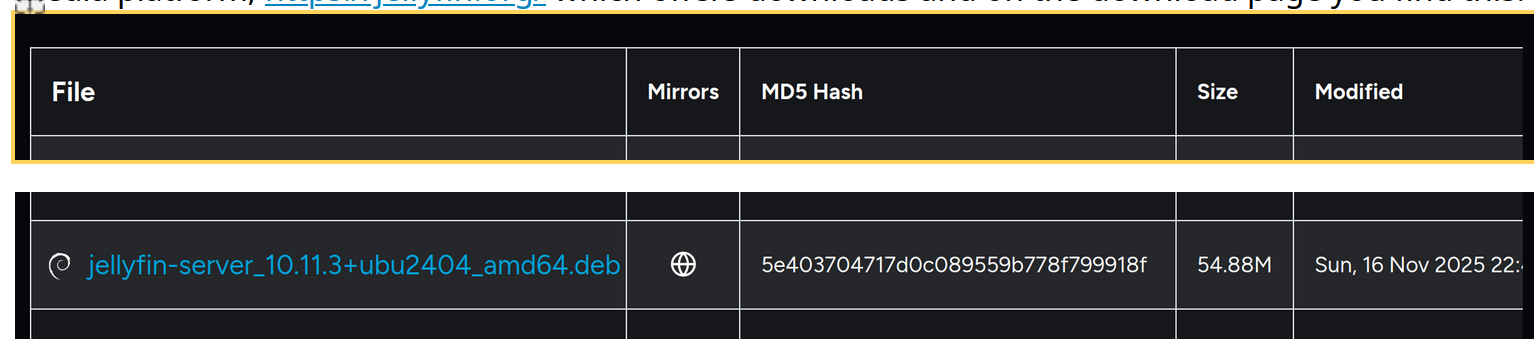

(source https://repo.jellyfin.org/?path=/server/ubuntu/latest-stable/amd64 )
So the download is jellyfin-server_10.11.3+ubu2404_amd64.deb and the md5 hash is: 5e403704717d0c089559b778f799918f
After I down load that file I can check the hash in a terminal (on windows this is mostly called powershell) but I do not have windows so I am doing it in Ubuntu with this result:

So I type md5sum and the name of the file and this returns the string:
5e403704717d0c089559b778f799918f
and as you can see those strings are the same and therefore I am 100% sure I downloaded the correct file.
I also went to https://www.virustotal.com/gui/home/search and entered the string there and it detected no issues.
To add to this example I downloaded a malicious file from this website:
https://www.eicar.org/download-anti-malware-testfile/#top
I downloaded the eicar_com.zip and checked the hash file:
sha256sum Downloads/eicar_com.zip
2546dcffc5ad854d4ddc64fbf056871cd5a00f2471cb7a5bfd4ac23b6e9eedad Downloads/eicar_com.zip
so the hash is 2546dcffc5ad854d4ddc64fbf056871cd5a00f2471cb7a5bfd4ac23b6e9eedad and I uploaded that to virustotal and well it returned a lot of warnings but maybe you should test this yourself on virustotal.
MD5 and SHA‑256 are both hash functions, but SHA‑256 is much more secure while MD5 is faster and weaker.
For windows user, this is the manual to check it on Windows:
Steps using PowerShell (built-in)
Open PowerShell.
Run the command:
Get-FileHash -Path "C:\path\to\your\file" -Algorithm SHA256
PowerShell will output the SHA-256 hash of the file.Compare this hash string with the known correct SHA-256 hash to ensure they match exactly.